
Introduction
Tuition Fee collection is one of the most crucial tasks in a school because salaries, budgets, and operations depend on it. Fee Management is the systematic process of collecting, tracking, and recording school fees from the first invoice to the final receipt. However, many institutions continue to use manual systems like spreadsheets, paper invoices, and payment notes to manage their tuition fees. This is why institutions miss payments and struggle to account for them.
A reliable tuition management system fixes much of this. It reduces administrative workload and errors, increases transparency and eases payment tracking, and provides an overview of school finances for leaders.
This guide is a practical walkthrough for administrators, principals, and finance teams who want a simpler way to handle school fees.
What Is Fee Management?
What Does School Fee Management Include?
School fee management covers more than collecting payments. It helps schools organize billing, track payments, and keep finances running smoothly.
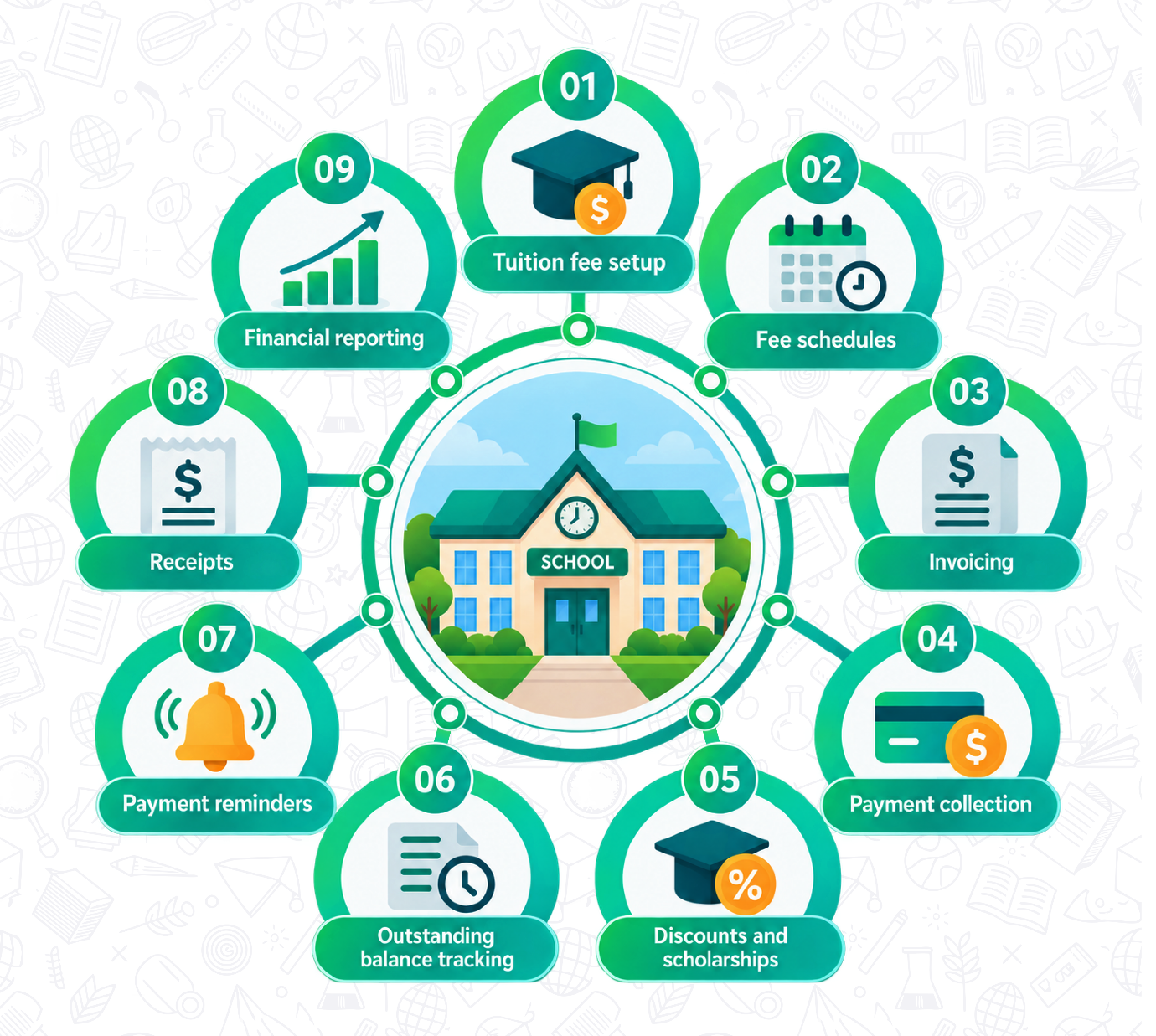
Key components of a complete fee management system include:
Why Is Fee Management Important for Schools?
A proper system plays an important role in keeping a school’s finances accurate, organized, and easy to manage.
Key benefits include:
- It keeps financial records organized, so the school administration never has to hunt through files to find them.
- It helps schools see who has paid, who has not, and who still owes part of a balance.
- It makes paying easier for parents and collecting easier for administrators, which means fewer delays.
- It cuts down on manual data entry, which lowers the chance of typing mistakes and duplicate records.
- It gives leaders a clear picture of school revenue and unpaid fees, so they can plan budgets with confidence.
Key Components of Effective School Fee Management
Successful tuition management goes beyond simply collecting fees. It includes arranging each aspect of the process, from the fee structure to issuing statements and payments. A well-structured system minimizes mistakes, saves time on administration, and offers parents a clear and convenient payment experience.
- Fee structure and tuition setup: defines what each student has to pay.
- Student billing: links the right charges to the right student.
- Invoices: give parents a clear, official record of what is due.
- Payment collection: brings in payments in an organized way.
- Online payments: let parents pay without visiting the office.
- Discounts and scholarships: apply fee adjustments accurately.
- Late fees: encourage payment by the due date.
- Outstanding balances: show who still owes what.
- Payment reminders: cut down on missed deadlines.
- Receipts: confirm every payment received.
- Financial reports: turn payment data into useful insight.
Want to simplify your school's fee collection?
How to Create an Effective School Fee Structure
Define Tuition and Other Fees
Start by listing all the charges parents can expect to see:
- Tuition fees
- Admission fees
- Registration fees
- Transportation fees
- Activity fees
- Technology or resource fees
- Other applicable charges
Set Payment Schedules
Decide if payments will be made on a monthly, quarterly, semester, or yearly basis. No matter what method you choose, make sure you inform the parents about it in advance and in writing, so nobody is surprised later.
Manage Discounts and Scholarships
Fees may vary from student to student due to sibling discounts, need-based financial aid, merit-based scholarships, early payment discounts, or custom-fee adjustments. Make sure to keep an accurate record of every adjustment, including who approved it and why, so your numbers always add up and parents receive fair, consistent treatment.
How to Manage School Fee Collection
Good school fee management software makes collection far easier, but the basic steps stay the same for any school.
Generate and Send Invoices
Create accurate invoices that clearly show fees, discounts, due dates, and outstanding balances. Make them easy for parents to access at any time.
Offer Convenient Payment Options
The easier it is to pay, the faster fees come in. Options may include:
- Online payments
- Bank transfers
- Credit or debit cards
- Other supported digital payment methods
- In-person payments where applicable
Track Payments and Outstanding Balances
Record payments immediately, track unpaid and partially paid invoices, keep each student’s payment history, and flag overdue balances early.
Improve Parent Communication About School Fees
Poor communication is one of the major reasons for payment delays. When parents are aware of their charges, due dates, and payment options, they ask fewer questions and clear their dues in a timely. Some good communication tools are:
- Fee due-date reminders
- Payment confirmations
- Outstanding balance notifications
- Invoice notifications
- Receipt delivery
- Changes to fee schedules
- Important payment instructions
When these updates come from one central place, administrators spend far less time answering the same questions by phone or email.
Want parents to see fees, invoices, and receipts in one place?
Automate School Fee Management
Automate Recurring Fees and Invoices
Set up predefined billing schedules and issue automated invoices rather than repeatedly entering the same information month after month.
Automate Payment Reminders
Send payment reminders ahead of deadlines, late notices for overdue payments, and follow-up messages without anyone having to remember.
Automate Receipts and Records
Issue digital payment receipts, maintain payment records, and keep a full transaction history in the background.
All these steps combined will save administrative time and effort on your end. A good tuition management software system should perform all these functions independently, without extra effort from your staff.
School Fee Management Reports & Financial Tracking
Good reports show administrators what is happening with the school funds:
- Total Fees Collected: Shows the total amount received during a selected period.
- Outstanding Fees: Displays the total amount students still need to pay.
- Overdue Payments: Identifies unpaid fees that have crossed due dates, making follow-ups easier.
- Student Payment History: Provides a complete record of each student’s payments, dues, discounts, and payment dates.
- Discounts & Scholarships: Tracks fee concessions, scholarships, and the amounts deducted from students’ fees.
- Monthly Collection: Shows how much fee revenue the school collects each month and helps monitor collection trends.
- Fee Collection by Class or Grade: Breaks down fee collections by class/grade to identify which groups have paid or have pending dues.
- Payment Method Breakdown: Shows collections made through cash, bank transfer, cards, online payments, or other methods.
- Financial Summaries: Provides an overall view of total collections, pending dues, discounts, and other key financial figures in one place.
It becomes easy to monitor the collections process and identify any issues that may arise, with the help of these figures. This becomes possible with fee management software, since the data is already organized and up-to-date.
Common School Fee Management Challenges and Mistakes
- Relying entirely on spreadsheets can make tuition management time-consuming and lead to outdated records.
- Maintaining duplicate payment records creates confusion and makes it difficult to determine accurate student balances.
- Manual invoice creation takes up staff time and increases the chances of calculation and data-entry errors.
- Missing payment records make it difficult to verify whether fees have been paid and maintain accurate financial histories.
- Poor communication about due dates can result in missed payments and delayed fee collection.
- Not tracking outstanding balances makes it harder for schools to identify unpaid fees and follow up with parents.
- Complicated payment processes can discourage timely payments and create unnecessary work for both parents and staff.
- Inconsistent discount records can lead to incorrect fee calculations and confusion over scholarships or concessions.
- Delayed payment reconciliation can leave student accounts showing incorrect or outdated balances.
- Lack of centralized reporting makes it difficult for administrators to monitor collections, dues, discounts, and overall financial performance.
- Not providing parents with easy access to fee information can make it harder for them to view due dates and outstanding balances.
Most of these problems come from scattered, manual processes. Centralized records, clear procedures, and dependable school fee management software help schools avoid them.
How to Choose Fee Management Software for Your School
Comparing options is easier with a checklist. Use this table to judge any fee management software before you commit.
| Feature | Why It Matters |
|---|---|
| Fee Structure Management | Helps schools organize different fees |
| Invoicing | Makes billing more consistent |
| Online Payments | Gives parents convenient payment options |
| Payment Tracking | Shows paid, partial, and unpaid fees |
| Discounts & Scholarships | Handles fee adjustments accurately |
| Automated Reminders | Helps reduce missed payments |
| Receipts | Provides payment confirmation |
| Parent Access | Lets parents view relevant fee information |
| Reporting | Gives administrators financial visibility |
| Security | Protects student and payment information |
| Integrations | Connects fee management with other school systems |
| Mobile Access | Allows administrators and parents to access information easily |
How Muntazim Supports School Fee Management
Muntazim is a cloud-based school management solution that serves Islamic, weekend, Maktab, and Hifz programs. It is a fee management software for schools, with its fee module made flexible to fit the requirements of different Islamic schools.
School administrators can generate invoices, manage pending payments, send automated payment reminders, and have live insight into their finances without maintaining multiple spreadsheets. Parents have access to their own portal where they can review their fee payments and receipts and make payments online.
Fee connects to the same student and parent records used for admissions, attendance, and communication, staff do not need to enter information twice. Access controls also let schools decide who can see financial data. Muntazim also integrates with MOHID for member discounts.
Frequently Asked Questions (FAQs)
It is the process of setting up, billing, collecting, tracking, and reporting tuition and other school fees.
It keeps financial records organized, reduces errors, and gives administrators a clear view of revenue and unpaid balances.
Fee setup, invoicing, online payments, payment tracking, discounts, reminders, receipts, parent access, and reports.
By recording every payment right away and using fee management software to show paid, partial, and unpaid invoices in one view.
By using recurring invoices, automatic reminders, and digital receipts that update payment records on their own.
Through a parent login or app connected to the school's system, where they can view invoices, pay, and download receipts.
By recording each adjustment in the system with a clear reason, so totals stay accurate and consistent.
Total collected, outstanding and overdue fees, payment history, monthly collection, collection by class, and payment method breakdown.
A tuition management system keeps invoices, payments, reminders, and reports in one place, so staff spend less time on manual work.
Conclusion
The key aspects of effective tuition management do not only revolve around collecting the school’s tuition. It involves creating an explicit fee schedule, issuing proper invoices, managing all payments, communicating effectively with parents, eliminating redundant processes through automation, and leveraging reports for understanding the school’s financial situation.
A centralized digital solution will decrease the volume of administrative activities and increase financial transparency for the school management team. Take a close look at your current process, find the tasks that take the most time, and start by simplifying or automating those first.
Not sure how your current process compares?
See how a Muntazim handles collection from start to finish.
Aamnah Farhan
Aamnah is a Content Marketing Professional specializing in school management software, student information systems, and Islamic school challenges & solutions. She develops research-driven content that helps schools and educational institutions streamline operations, adopt digital solutions and stay informed about the latest trends in education and school management.